Image: xTool
In this article
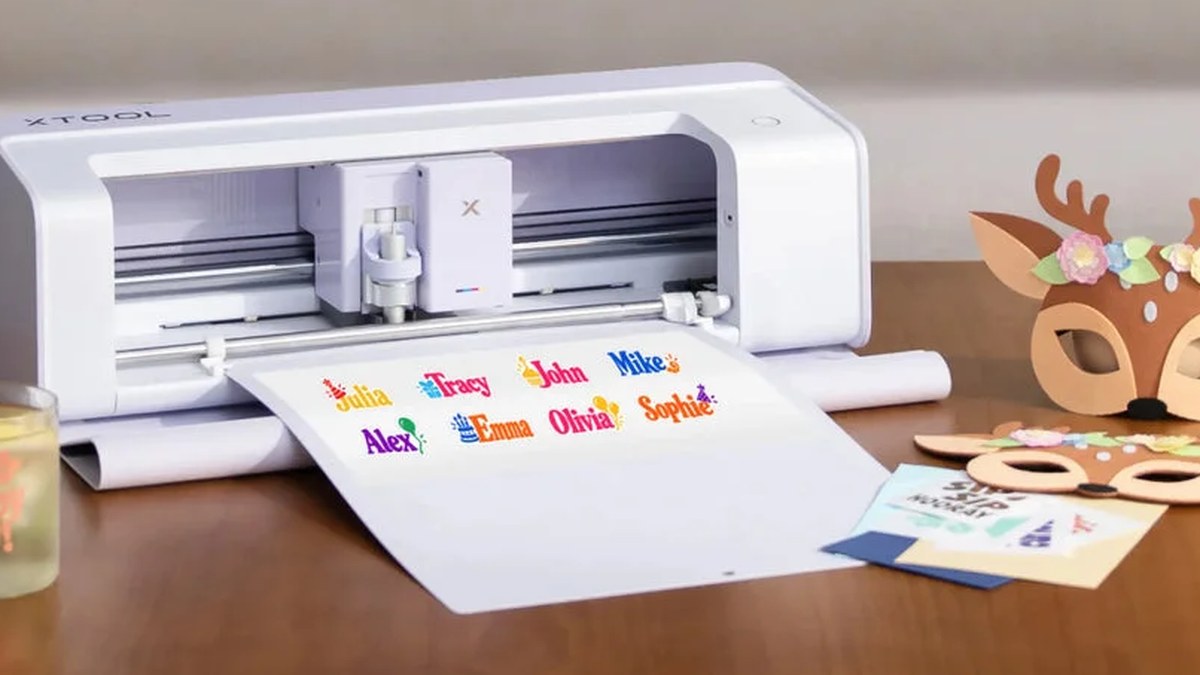
xTool is moving into Cricut’s territory. Its first craft cutter, the C1, has a color inkjet printer and a scanner built in, starts at $469, and takes $10 reservations now ahead of a November 5 launch.
TL;DR
- The xTool C1 prints in CMYK, scans what’s on the mat, and cuts with a blade, all in one machine. With Cricut’s Print Then Cut you print on a separate home printer first.
- It starts at $469 (£399 in the UK). A $10 deposit, refundable until final payment, reserves one now.
- Final payment opens November 5 at 6 PM Pacific, and xTool says US orders start shipping in early to mid November.
- xTool hasn’t published ink cartridge prices or yields, so the running cost is still unknown.
My take
As someone who bought my wife a Cricut so she could make things, I think this is something that could really hurt Cricut. The biggest question I have for them is whether they have an answer in the works.
I’m not super deep into these types of tools, but I think current Cricut owners will be inclined to make the switch if the ink isn’t too pricey.
Again, I’m new to xTool and only know as much about Cricut as my wife tells me, and when I told her about the xTool C1, she didn’t seem enthusiastic to switch at all. What that told me is that Cricut may always have its own fan base as the default cutter.
What xTool announced
xTool announced the C1 Color Cutter on October 20 and calls it the company’s entry into the craft cutter market. xTool describes itself as a leader in desktop laser engravers and digital printers. The C1 has no laser. It cuts with a blade, like a Cricut or a Silhouette.
The difference is what happens before the blade comes down. The C1 prints your design onto the material with a four-color inkjet, then cuts around it. A built-in contact image sensor scans whatever is on the mat and shows it on screen at 1:1 scale, so you can place a design on an odd-shaped scrap or trace a hand drawing and cut it out. xTool says it doesn’t need registration marks, because the printing happens on the same machine that cuts.
Price, bundles and dates
The US press release says the C1 starts at $469. The UK release says £399. The reservation page lists two bundles with the same machine. Basic comes with an ink cartridge, the Fine-Point blade, a cutting mat and a starter pack of materials. The other adds a month of Atomm Pro, xTool’s paid design service. xTool hasn’t posted a price for that one yet.
Reserving costs $10, and the page says you can get a full refund any time before final payment. People who reserve get a material kit, a one-time 20% off coupon for materials, and an entry into a giveaway for a free C1. Final payment opens November 5 at 6 PM Pacific. xTool says US orders start shipping in early to mid November, that launch stock is limited, and that orders ship in the order they’re completed. It’s being sold on xTool’s US, Canadian, UK, EU and Australian stores.
What it prints on and cuts
xTool’s product guide lists four blades. The Fine-Point blade handles paper and vinyl up to 1 mm, the Deep-Point blade takes leather and cardboard up to 2 mm, a heavier cutting blade goes up to 3 mm for balsa and leather, and a rotary blade cuts fabric. There’s also a foil transfer tip, an electrostatic mat, a roll holder with a built-in trimmer, and fine-tip pens. Only the Fine-Point blade comes in the Basic bundle.
It prints on sticker paper, regular paper, heat transfer paper, pretreated fabric and shrink film, and on wood or acrylic if you spray them with a print primer first. xTool calls its ink Duraproof and says it’s waterproof and holds up for up to 30 home washes on clothing. For apparel you still need a heat press, which isn’t in the Basic bundle.
It uses standard 12 x 12 inch mats. Third-party mats work for printing and cutting, but the reservation page says scanning only works with xTool’s own mats. Scanning the QR code on xTool’s own materials sets the cut settings for you.
How it compares with Cricut
Cricut’s Print Then Cut works with your own printer. You print the design with sensor marks around it, put the sheet on the mat, and the cutter reads the marks to line up its cuts. Cricut’s help center says part of the page is reserved for those marks, so the cuttable area isn’t a full rectangle. On a letter-size sheet, Explore and Maker machines top out at 9.94 x 7.44 inches.
Cricut has started putting printers in its own machines too. Its StickerPix line, released in late September, includes a Print + Cut model, from $299, that prints with dye sublimation, laminates the print and cuts the sticker shape with a built-in blade. That one is built for stickers, photo prints and labels. The C1 is a full-size cutter that also prints.
What we don’t know yet
The big one is ink. xTool hasn’t published cartridge prices, page yields or a print resolution on its own pages. The Gadgeteer reports a maximum of 720 x 1200 dpi, but we haven’t seen that from xTool. xTool’s support page for the C1 is up, but every section still says “Coming Soon,” so there are no manuals or spec sheets to check yet. A lot of the design features also run through Atomm, xTool’s online platform, and the reservation page doesn’t say which of them need the paid Pro plan after the first month.
We’ll update this once xTool posts full specs and ink pricing at launch.
Sources
- xTool press release: C1 Color Cutter launch (US, October 20, 2026)
- xTool press release (UK, October 20, 2026)
- xTool C1 reservation page
- xTool: Meet xTool C1 (product guide, updated October 19, 2026)
- xTool Support Center: C1 Color Cutter
- Cricut Help Center: How large can I Print Then Cut?
- Cricut press release: StickerPix (September 29, 2026)
- The Gadgeteer, “xTool C1 skips the separate printer for full-color stickers and crafts” (October 20, 2026)